
RELEASE NOTES · 2026

Dual-platform
changelog.

More granular than a timeline: new features, UI tweaks, test builds, and important fixes, all listed here by date.

2
Native platforms
61
Public records
2026.05
Development started
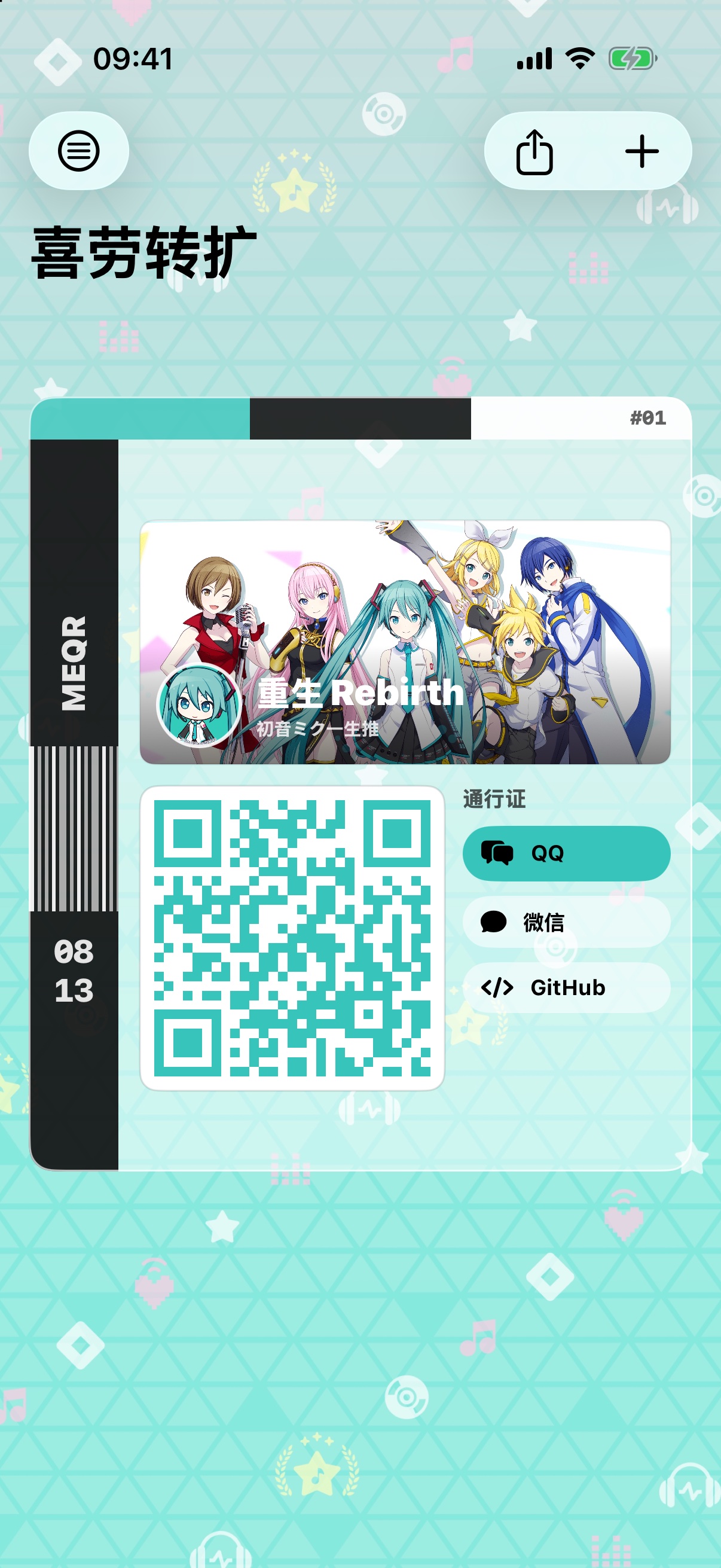
MeQR iOS card interface
iOS1.3.0 Live
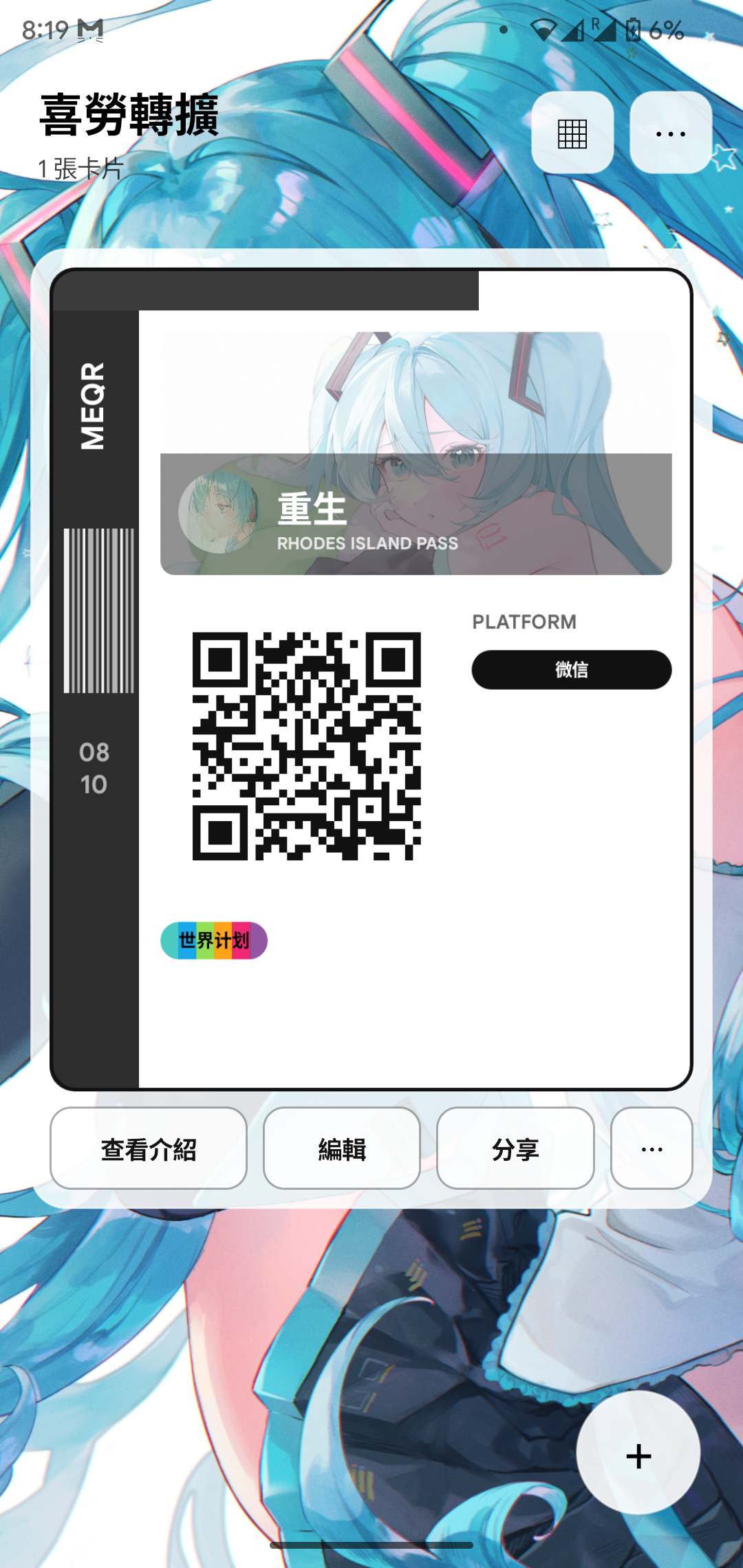
MeQR Android home interface
Android1.3.0 Live

01 / UPDATE ARCHIVE

Dual-platform development log

Everything is shown by default; you can also filter down to a single platform.

Site1.3.0

RELEASE

1.3.0 released on both platforms; multi-device sync is live

iOS and Android 1.3.0 shipped on September 19.

  • Added multi-device sync: binding codes last 10 minutes and require owner approval, with up to five devices supported.
  • Sync covers QR codes, Tags, avatars, backgrounds and banners; a privacy notice appears before sync is enabled.
  • Added the Terms of Use, expanded the Tag catalog and fixed reported issues.
Site1.2.0

RELEASE

1.2.0 released on both platforms; online tag library restored

The regular update was moved up and released on September 11 at 21:00 (UTC+8).

  • Online tag library maintenance has ended, and the full catalog (450 entries / 27 categories) is live again.
  • Android 1.2.0 (13) is out via the official APK and in-app update.
  • Fixed the Project Sekai tag color bug from 1.1.0.
SiteSCHEDULE

SCHEDULE

1.2.0 moved to the evening of September 11

The regular update was moved up and released on Friday, September 11 at 21:00 (UTC+8).

  • Online tag library maintenance has ended, and this round of tag upgrades shipped with 1.2.0.
iOS1.2.0

1.2.0

Tag colors, font weights and editing improvements

Released with 1.2.0 on September 11.

  • Drag selected tags directly. Compact chips now have consistent spacing, alignment and small-screen layout.
  • Choose Solid, Mixed or Custom. Color controls appear only in Custom, with up to five colors retained when switching back to defaults.
  • Project Sekai keeps its six-color preset and blue solid preset. Fixed ignored custom colors on preset tags and the gray LoveLive! tag.
  • Each tag has a B button cycling through Regular, Semibold and Heavy, saved independently.
  • The library includes Recent, Frequent, version, source and change history. Native issue reports are supported, and reports queue offline and resend automatically.
  • Fixed iPhone SE setup layout. QR links now show destination and platform-format warnings, with full-content confirmation before opening.
Android1.2.0 (13)

1.2.0

Tag input and the toolbar aligned with iOS

Released with 1.2.0 on September 11.

  • Confirmed input becomes compact tag chips, with removal, deduplication and direct drag-to-reorder. Unsubmitted text is retained.
  • Solid, Mixed and Custom modes support up to five custom colors. Project Sekai retains six preset colors and solid blue; the gray LoveLive! tag is fixed.
  • The library adds Recent, Frequent, version, source and history, plus native in-app issue reports that queue offline and resend automatically.
  • Scan, share and add are grouped at the top right. Card management stays on the left; the duplicate floating add button is removed.
  • Fixed Back navigation, setup draft restoration, protection after failed saves, icons and platform selection.
  • QR links gain destination and format warnings plus confirmation before opening. Each tag supports an independent font weight (Regular, Semibold, Heavy).
SiteMULTILINGUAL

MULTILINGUAL

More pages available in English and Japanese

Progress, changelog, release and announcement pages now have English and Japanese versions.

  • Language switching is available on each page. Announcement details retain their in-page language selector.
SiteTICKET FIX

TICKET FIX

Fixed stalled ticket submissions and 403 errors

Fixed the redirect after a successful submission in some mobile browsers.

  • Corrected the expired-page error on repeat submissions while retaining submission validation.
SiteTAG LIBRARY

TAG LIBRARY

Online tag library under maintenance

The app temporarily uses its bundled library for offline browsing and editing.

  • The full online catalog is retained. The September 7 announcement schedules its return with 1.2.0 on September 11 at 21:00 (UTC+8).
iOS1.1.0

OFFLINE TAG LIBRARY · ANNOUNCEMENTS

Tag library goes built-in; new in-app announcements

The online tag library is paused for maintenance (expected to return with the next regular update); tag data now ships inside the app and works offline.

  • The tag library is now stored locally in the app; browsing and editing card tags no longer requires a network connection.
  • New announcements feature: read the latest site notices right inside the app.
  • Fixed several ticket reports and known issues.
  • Passed App Store review and was released on September 5 at 09:00 (UTC+8).
Android1.1.0 (12)

OFFLINE TAG LIBRARY · ANNOUNCEMENTS

Tag library goes built-in; new in-app announcements

Released on the same day as iOS 1.1.0. The online tag library is paused for maintenance (expected to return with the next regular update); tag data now ships inside the app and works offline.

  • The tag library is now stored locally in the app (assets/tags-v1.json); browsing and editing card tags no longer requires a network connection.
  • New announcements feature: read the latest site notices right inside the app.
  • Fixed several ticket reports and known issues.
SiteRELEASE DAY

RELEASE DAY

1.1.0 released; iOS tag color issue explained

1.1.0 is available on both platforms. Website release content switched over at 09:00 (UTC+8).

  • Project Sekai incorrectly appears pink in iOS 1.1.0. A notice is published and the fix is planned for 1.2.0.
  • Android was rebuilt with the correction; the website and in-app updater serve the corrected package.
SiteTICKETS

TICKETS

Simplified ticket statuses

Removed Closed and moved historical closed tickets to Resolved.

  • Filters cover All, Unresolved, Open, In Progress and Resolved.
AndroidDEV CHECK

DEV CHECK

Reuse update downloads

Implemented and compile-checked a fix for duplicate downloads after interrupted updates. This entry does not announce a separate release.

  • The same update reuses an active download, or reopens installation if the completed file passes validation.
SiteQR IMPORT

QR IMPORT

Clarified social-platform QR imports

A trilingual notice explains why a QQ number or WeChat account cannot reproduce an official personal QR code.

  • Import from the official QR image instead. The full explanation is in Announcements.
SiteANNOUNCEMENTS

ANNOUNCEMENTS

Announcements section launched

Important notices now have a dedicated list linked from the homepage, downloads and support site.

  • Tag maintenance details are available in Chinese, English and Japanese; app 1.1.0 also displays announcement data.
SiteMULTILINGUAL

MULTILINGUAL

English and Japanese website versions launched

The homepage, downloads, support and ticket sites now offer English and Japanese versions.

  • Use the language selector at the top right.
iOS1.0.1

1.0.1

iOS 1.0.1 emergency fix released

Released after expedited App Store review.

  • Fixed crashes on iOS 17 devices.
  • Updated the scanner to open supported social-platform QR codes directly.
SiteCONTACT

CONTACT

Contact page and download information revised

Reorganized QQ, Xiaohongshu, email and support links, with mobile layout fixes.

  • Merged duplicate release information on the download page and updated the website contact email.
SiteMIKU 19TH

MIKU 19TH

Hatsune Miku 19th anniversary page launched

Added a dedicated anniversary page linked from the main site.

  • The page has its own artwork and anniversary content; app functionality is unchanged.
Android1.0.1 (11)

TAG PERFORMANCE · ANR FIX

Large tag categories no longer freeze

Fixed an issue where opening tag categories with many entries, such as Blue Archive, froze the interface long enough for the system to flag the app as unresponsive.

  • Tag names, aliases, colors, and category relations are now indexed once at load time.
  • Tapping and selecting tags no longer rescans the entire online catalog.
  • Large categories are now paginated at 24 items per page, avoiding creating hundreds of interface entries at once.
  • Released 1.0.1 after friends confirmed the fix in testing.
SiteLAUNCH DAY

OFFICIAL LAUNCH · DOWNLOAD PAGE SWITCH

Both platforms officially live; download flow switched over

The official release went live on August 29 at 08:00 (UTC+8), and the site's download page switched over at the same time.

  • When the countdown hit zero, the buttons lit up automatically: iOS goes straight to the App Store, Android goes straight to the APK download.
  • Download page redesigned after launch: the countdown block was removed and download buttons are now permanent.
  • New "Latest version" page (/release/) recording the current version number and the contents of each release.
Android1.0.0 (10)

PRE-RELEASE FIXES

One last round of fixes before launch

Before the 1.0.0 release, we worked through the issues found in on-device regression testing and aligned the details with iOS.

  • Fixed a crash when uploading a landscape pass header image: large images are now compressed before cropping instead of decoding the whole original at once.
  • The About page now uses grouped cards, matching iOS.
  • The card opacity slider now runs 25%–100% in 5% steps, matching iOS; opacity only affects the card background, so the avatar no longer turns transparent with it.
  • Removed the platform name chips from the card back, keeping only the avatar, name, bio, and tags; the back-side tags are one size larger.
  • Fixed some online-exchange avatars not displaying; removed the old card sharing entry — exchanging now always goes through the MeQR exchange code.
SiteNEW PAGES

LETTER & THANK YOU

"A letter from the developer" is online

The long letter written on the eve of launch now has its own page, and the Android thank-you download page got a new layout.

  • New /contact/a-letter-from-Rebirth/ page, typeset from the original text, with a PDF download.
  • Both the homepage and the download page now link to the letter.
  • Android thank-you page rearranged: "a word from the developer" moved above the version info, and the sign-off is now a handwritten signature image.
Android1.0.0 (10)

PARITY & ONBOARDING

Scan routing and setup guidance aligned with iOS

Several experience fixes that landed on iOS first have now been synced to Android.

  • Universal scan routing: WeChat codes open WeChat's scanner, Xiaohongshu short links resolve and open the Xiaohongshu profile directly, and other platforms prefer their own app.
  • The light colorway of colored exchange codes is more saturated, and no longer falls back to black-and-white when the avatar doesn't fit.
  • Seven setup-flow fixes: live avatar preview, automatic platform detection for QR codes, live card preview, tags turned into tappable chips, and an info summary on the final step.
  • Added the "short label" input to the pass template and the filing number to the About page, both aligned with iOS.
SiteTHANK YOU PAGE

ANDROID DOWNLOAD

Android thank-you download page is online

The Android download entry changed from a bare APK link to a "thank you for downloading" page.

  • Opening /appdownload/android/?dl=1 starts the download automatically, and the page shows which number downloader you are.
  • The page carries "a word from the developer" for Android users, with the public-beta upgrade notice kept in a collapsed section.
  • The direct APK link works normally again and is no longer redirected.
iOSAPPROVED

APP STORE REVIEW · PASSED

Both approvals passed; release set for August 29

iOS 1.0.0 passed App Store review and the public-security filing was approved; filing and review are both complete. The official release is set to go live on August 29 at 08:00 (UTC+8).

  • iOS 1.0.0 passed App Store review with manual release; it goes live on August 29 at 08:00 (UTC+8).
  • The public-security filing passed; 粤公网安备44030002015315号 is now shown in the site footer.
  • The ICP app filing (粤ICP备2026097629号-2A) had already passed; both filings are complete.
  • The download page gained a launch countdown that runs on China time (UTC+8), regardless of the visitor's local time zone.
SiteCOUNTDOWN

LAUNCH COUNTDOWN

Launch countdown on the download page

After passing review, the download page got a countdown to August 29 at 08:00.

  • Three frosted-glass cards for hours, minutes, and seconds, switching to unit and member colors as time runs down.
  • A little Easter egg: any remaining time containing 39 turns #39C5BB.
  • Runs on China time (UTC+8), independent of the visitor's time zone.
iOSEXCHANGE & SCANNER

EXCHANGE CODE · SCANNER

Exchange codes carry full profiles; the scanner reads more codes

A focused round of updates to online exchange codes and the scanning experience.

  • Online profiles now carry the full bio and card theme color instead of just one line.
  • Online profiles opened by scanning now render as a web name card, viewable in a browser.
  • A dedicated scan entry was added at the top of the home screen; common QR codes from WeChat, QQ, Xiaohongshu, and the like jump straight to the corresponding app, falling back to the browser if it isn't installed.
  • The scan result page was redesigned to match the home screen style; colored exchange codes no longer fall back to black-and-white.
SiteSUPPORT SITE

UPDATE CADENCE · WEB PROFILE

Support site "update cadence" page and web name cards

The support center gained a page explaining the update cadence, and online exchange profiles now have a proper look in the browser.

  • New /updatetimeline/ page on the support site explaining the weekly update and ticket-handling cadence, with severe issues expedited within 48 hours.
  • Opening an online exchange profile in a mobile browser or by scanning now shows a web name card with avatar, bio, and QR code, instead of a string of data.
iOS1.0.0 (4)

APP STORE REVIEW · SUBMITTED

iOS release submitted for App Store review

All launch materials are ready; the iOS 1.0.0 release has been submitted to App Store review and is in the queue.

  • iPad support removed; the 1.0.0 release targets iPhone only.
  • The About page gained a filing-info entry showing 粤ICP备2026097629号-2A and linking to the MIIT filing system.
  • App Store listing finalized: six screenshots, privacy labels, and the age rating (4+) have all been submitted.
  • Build 4 was uploaded to App Store Connect and submitted for review; it will be released manually once approved.
SiteDATE ANNOUNCED

LAUNCH DATE

Download page announces the launch date

On the day iOS was submitted for review, the site published the official launch date at the same time.

  • Site-wide notices unified to "Launching August 29, 2026 at 08:00 (UTC+8)".
  • The download page changed to three side-by-side cards for iOS, Android, and Huawei/HarmonyOS, showing the launch time before release.
iOSFILING PASSED

ICP APP FILING · APPROVED

ICP app filing approved; launch preparation begins

The authority approved the filing, formally completing the filing stage. MeQR (喜劳转扩) now begins preparing the iOS and Android releases.

  • The ICP app filing was approved on August 19, 2026.
  • iOS TestFlight and Android public testing had both already ended.
  • The next stage is preparing release builds, store listings, and pre-launch checks; the app is not yet marked as live.
SiteNEW PAGES

CONTACT & SUPPORT

Contact page and support site are online

The site filled in two entries that had been missing all along.

  • New /contact/ page with QQ, Xiaohongshu, and email in one place.
  • The help and support site launched, with FAQs, on-site search, and HarmonyOS notes.
  • The download page gained Huawei/HarmonyOS notes explaining which systems can install the app and how.
iOS1.0.1 (16)

TAG FIX · ICP FILING

Tag color fixes and ICP app filing submitted

Fixed an issue where maimai-family and Wonderlands x Showtime tags appeared gray at app launch, and submitted the ICP app filing at the same time.

  • The maimai / maimai 10000+~15000+ tag series was added to the local color mapping, so they no longer appear gray before the catalog loads.
  • Fixed color lookup failures for Wonderlands x Showtime tags caused by 20-character truncation, adding compatibility for truncated aliases.
  • Fixed tag chip text being cut off by floating-point rounding in certain layouts (ClusterCardView).
  • Pre-filing code audit: removed force-unwrapping in BackupManager and added a 15-second timeout to EncounterStore network requests.
  • Build 16 was uploaded to App Store Connect; the ICP app filing (order 2035818131548) was submitted today and is under review.
Android1.0.8 (9)

PRE-FILING AUDIT

Dual-platform stability audit before filing

Completed an iOS and Android code review before submitting the filing, fixing the stability issues it confirmed.

  • Added parent-view null protection to the color picker's touch interception, avoiding crashes in extreme mount timing.
  • Response streams for online profile upload and reading now close automatically; error paths no longer leak network resources.
  • Debug build and lint both pass, with install-and-launch verified on a physical Android device.
Android1.0.8 (9)

iOS-STYLE HOME · RELEASE SIGNING

Android home becomes single-card paging, aligned with iOS

The Android home screen now uses the same single-card paging as iOS, card actions moved to the top, and the build switched to the release signature.

  • One card per screen on the home page; swipe left or right to switch, with dots at the bottom indicating the current card.
  • Tap the platform buttons on the right of the card face to switch the corresponding QR code; tap elsewhere on the card to flip it.
  • Card actions like edit, share, and delete moved to the top menu; there are no more buttons around the card.
  • Tapping a color swatch in appearance settings now opens a color picker instead of requiring manual value entry.
  • From this version on, the app uses the release signature: existing beta users must back up their data in the app, uninstall the old version, then install 1.0.8 and restore.
iOSFILING PREP

APP IDENTITY

App identity re-confirmed before filing

The iOS bundle ID was updated to com.lucasli.meqr. Apple will treat it as a new app identity, so the store relationship must be re-established and reviewed again.

  • The app and its component identifiers all migrated to the new com.lucasli.meqr namespace.
  • App info, service domains, privacy notes, and launch materials are being consolidated per the filing requirements.
  • Currently in the pre-filing preparation stage; not yet marked as filed or approved.
iOS363 TAGS

TAG LIBRARY · UX FIX

Browse the tag library by IP, expanded to 363 entries

Tag selection grew from simple input suggestions into a catalog browsable by IP, alongside new series, character colors, and editing experience fixes.

  • New catalog button next to the tag input; search uses a prebuilt index, 120ms debounce, and local caching for smoother typing and scrolling.
  • Added the blue-and-white Blue Archive main tag, the maimai main tag, and the Rating series; VOCALOID now covers all six Crypton characters.
  • Character tags consistently use a split of the work's or unit's color and the character's personal color; the solo Hatsune Miku tag keeps solid #39C5BB.
  • Fixed multi-line bios being covered by the keyboard, and now prompt for a 16:9 landscape header image after choosing the Arknights pass.
Android1.0.7 (8)

PUBLIC BETA

Android enters public beta; download entries merged

Android moved from invite-only testing to a public beta, and the site's download entries were merged into a single page.

  • Android is now in public beta; no invite code required.
  • The APK is hosted directly on the /appdownload/ page, version 1.0.7 (8), with size and checksum info.
  • In-app updates remain available; new versions will prompt inside the app from now on.
  • The site now shows both the public-security filing and the MIIT filing, unifying compliance info across pages.
Android1.0.7 (8)

TICKET FIX ROUND

A round of fixes from ticket feedback

Based on feedback from the ticket system: fixed out-of-bounds image cropping, rebuilt the More Settings page, and aligned the experience with iOS.

  • Image cropping now clamps out-of-bounds dragging: after extreme drags the image edge snaps precisely to the crop frame, with no more black borders.
  • The More Settings page was redesigned with looser layout and a brand-gradient background; the language picker and About page now use in-app styling.
  • Tag library colors now offer only "split / solid" options; arbitrary custom segment colors are gone.
  • The home background is now a full-screen background image, matching iOS.
  • Added a confirmation before sharing, and moved "More Settings" in the main menu to the top to avoid accidental shares.
Android1.0.6 (7)

TAG SEARCH FIX

Tag suggestions match again after typing

Fixed an issue where the tag library showed the entire catalog up front after the server catalog was integrated.

  • An empty input no longer displays the 201-entry server catalog; the page stays clean again.
  • Matching by name and alias now starts only after the user types, with suggestions limited to eight.
  • Server tag hot updates, split-color overrides, and in-app update capability are all retained.
iOS1.0.1 (14)

TAG SEARCH FIX

The tag editor no longer lists the whole catalog at once

Fixed a search regression that appeared after migrating to the remote tag catalog, restoring the editor's original type-to-match experience.

  • An empty input no longer matches the entire catalog; typing shows at most eight relevant suggestions.
  • First-time setup keeps its own six quick suggestions, unaffected by the editor's search rules.
  • 29 regression tests passed; build 14 was submitted to App Store Connect for processing.
Android1.0.5 (6)

REMOTE TAGS · IN-APP UPDATE

Tag library hot updates and in-app version updates

The tag catalog is no longer fixed to the APK; future additions, removals, aliases, and server-side color adjustments take effect directly.

  • The latest catalog is fetched from meqrcode.cn each time the tag library opens, without persisting a copy on the phone.
  • Tags already chosen on existing cards and user-defined colors stay saved locally and won't be lost to catalog changes.
  • Added automatic version checks, a manual check in Settings, in-app APK download, SHA-256 verification, and Android system install confirmation.
iOS1.0.1 (13)

REMOTE TAG CATALOG

Tag catalog moved to real-time server updates

The iOS tag search catalog moved out of the app bundle to the same 201-entry server catalog shared with Android.

  • Supports searching in Simplified Chinese, Hong Kong Traditional Chinese, Taiwan Traditional Chinese, English, Japanese, and common aliases.
  • The server catalog supports optional solid or split color overrides; new tags and colors no longer wait for a new TestFlight build.
  • On network failure, existing card tags are preserved, with a clear loading state and a retry entry.
Android1.0.4 (5)

SHARING FIX

Shared images no longer grayed out by card opacity

Share exports previously reused the on-screen card's opacity setting, which made the whole image look gray against the background of a photo album or chat app.

  • Sharing now creates a separate card copy and renders the exported image at 100% opacity.
  • The user's saved card opacity is untouched; in-app appearance and data stay as they were.
  • The original template, background, QR code, platform, and tag colors are preserved.
iOS1.0.1 (12)

ONBOARDING FIX

Fixed dark-mode text and the input-field overlay

Based on the first round of feedback on the new setup flow, fixed two interface issues that directly hurt readability in dark mode and when the keyboard appears.

  • The white sample card on the welcome page now always uses dark text for the name, description, and QR icon, instead of inheriting dark mode's white text.
  • The bottom action bar no longer slides up over the current input field when the keyboard appears.
  • Added corresponding regression checks and bumped the TestFlight build number to build 12.
Android1.0.3 (4)

ONBOARDING REDESIGN

The new setup experience comes to Android

The Android setup flow now matches iOS while keeping the native implementation and compatibility with existing data.

  • New dedicated welcome page, five numbered progress stages, a fixed bottom action area, and a completion page.
  • Reorganized the identity, QR code, appearance, tag, and final preview pages, with the production card renderer still serving as the final preview.
  • Online exchange, QR compatibility fixes, the tag library with split colors, both templates, and encounter records are all retained.
iOS1.0.1 (11)

PUBLIC BETA

The new first-time setup flow lands in build 11

The first-time setup flow was rewritten end to end, from welcome page to completion, so someone opening the app for the first time can truly finish a usable card from scratch.

  • Continuous step-by-step guidance covering avatar, nickname, bio, QR codes, appearance, and tags.
  • Added progress hints, a fixed action area, a completion page, animations, and reduced-motion support.
  • Online exchange, the production card preview, widget sync, and the automatic backup flow are all retained.
Android1.0.2 (3)

BETA FIX

Fixed menus, landscape header images, and tag color saving

Based on the first round of invite-beta feedback, addressed issues across different Android systems that directly affected setup and editing.

  • Recalculated the "More Settings" bottom sheet height; long menus can now scroll, so buttons and text are no longer squeezed.
  • Landscape header cropping now uses the same 143:68 ratio as the final card, keeping preview and output consistent.
  • Fixed custom solid and split tag colors resetting to defaults after switching QR codes or re-entering the editor.
Android1.0.1 (2)

EMERGENCY HOTFIX

Stronger QQ and WeChat QR code recognition

During the beta we found that some screenshot QR codes and some Android 16 / HyperOS devices couldn't scan reliably, so we paused downloads and shipped an emergency fix.

  • Added multi-stage QR decoding covering inverted colors, insufficient quiet zones, long screenshots, center cropping, and different binarization strategies.
  • Fixed Camera2 row stride, pixel stride, and frame release issues to keep the camera stream from stalling.
  • Completed QQ URI scheme recognition; downloads reopened after device and user re-testing passed.
Android1.0.0 (1)

INTERNAL BETA

Android invite-only beta begins

The first distributable native Android beta build is online, along with the official MeQR launcher icon and a dedicated download entry.

  • Supports multi-platform QR cards with both the standard and Arknights pass templates.
  • Includes first-time setup, card front and back, encounter records, the tag library, and one-to-three-segment split colors.
  • Locked to portrait, with the first visual polish pass on the home screen, editor, action menus, and button system.
iOS1.0.1 (10)

PUBLIC BETA

First-time setup and the TestFlight public beta

Starting from avatar, nickname, and bio, users are guided step by step to their first truly usable personal QR card.

  • New step-by-step first-time setup; drafts are only written to local data after final confirmation.
  • Template previews reuse the production card renderer, so what you see is what you get.
  • Locked to portrait, completed the App Store Connect upload, and opened the TestFlight public beta.
AndroidDEVICE BUILD

CORE EXPERIENCE

The core flow runs on a real Android device for the first time

Moved from the development environment to a real device, verifying the main flows: create, edit, present, share, and scan.

  • Completed the native home screen, QR cards, editor, platform detection, and local data storage.
  • Integrated online exchange codes with offline fallback info, keeping things usable without a network.
  • The first debug APK installed and launched on a physical Android device.
iOSPERSONALIZATION

TAGS & COLOR

Card tags, a theme library, and custom colors

Beyond QR codes and avatars, cards can now express the works, communities, and interests a user belongs to.

  • Added tag input with normalization, deduplication, and length limits.
  • Expanded theme tags and preset colors for Project Sekai, VOCALOID, MyGO!!!!!, and more.
  • Tags appear on the card back, with independently adjustable tag colors.
AndroidPROJECT START

SECOND PLATFORM

Native Android version begins

Decided against a simple web wrapper in favor of an independent native Android implementation that shares product logic and the exchange protocol with iOS.

  • Set up the Android project, base data models, and QR generation/recognition.
  • Synced the data contracts for profiles, cards, and the online exchange service.
  • Kept platform-native interactions while making feature parity the migration priority.
iOSCARD TEMPLATES

VISUAL SYSTEM

The standard card and the Arknights pass

Cards grew from a single look into a template system, establishing the interaction of QR codes on the front and full profiles on the back.

  • Added template selection with live preview, distinguishing portrait background images from landscape header images.
  • The pass gained a side rail, banner, avatar identity area, QR area, and date info.
  • Tap a card to flip it in 3D and view the bio and full profile.
iOSEXCHANGE

MEQR EXCHANGE

Online exchange codes, offline fallback, and encounter records

What you swap at offline events is a full profile with avatar and bio, and you can look it up again afterward.

  • Exchange codes carry both the online profile address and offline fallback info.
  • After scanning, you can save an encounter record and see the platforms the other person chose to share.
  • Added event mode to organize the people you meet by convention or gathering.
iOSBETA READY

DISTRIBUTION

Product info completed for TestFlight distribution

Moved from an internal debug project toward a test build that can be handed to real users.

  • Completed the privacy policy, About page, developer contact entry, and version info.
  • Finished Simplified Chinese, Traditional Chinese, English, and Japanese interface copy.
  • Set up the release archive, export, and App Store Connect upload pipeline.
iOSSTABILITY

LOCAL FIRST

Cropping, local data, and recovery rebuilt

This phase focused on reliability beyond "it runs", so finished cards don't go missing easily due to system or testing changes.

  • Rebuilt avatar and background cropping, unifying the coordinate logic between preview and actual rendering.
  • Removed the unreliable cloud container dependency, returning to local SwiftData first.
  • Added automatic backups, restore paths, data migration protection, and regression tests.
iOSWIDGETS

QUICK ACCESS

Home screen and lock screen widgets

Bringing frequently used QR codes from inside the app to the system home screen, cutting steps when showing codes in person.

  • Supports small, medium, and large home screen widgets plus a lock screen entry.
  • Added widget background images, opacity, and live in-app preview.
  • Fixed dark-mode background colors, system margins, and background clipping.
iOSPROJECT START

FOUNDATION

The first personal QR card

MeQR (喜劳转扩) started from the idea of "making personal QR codes nicer to organize and easier to show".

  • Built personal cards, QR profiles, and the local data model.
  • Supports avatar, background, text color, QR color, corner radius, and opacity.
  • Completed QR image import, platform detection, sharing, and card sorting.